Having a PDF does not mean you can quickly find the answer you need. A document may describe a normal procedure in one section, an exception somewhere else, and a limitation that changes how its numbers should be interpreted.
That is the kind of reading task I wanted to explore with Google’s notebook tools: understanding a small collection of sources, asking focused questions, and checking what an answer actually rests on.
This guide explains the main uses of NotebookLM and walks through a two-PDF exercise. I tested summaries and follow-up questions, compared answers with the documents, and listened to an English Audio Overview.
The question-and-answer screenshots below come from the notebook experience inside Gemini. The Studio screenshot shows the available content-generation tools. I distinguish the results of my exercise from features described in Google’s documentation.
A naming note: Google’s help pages consulted for this article use Gemini Notebook. I use NotebookLM here as the familiar name readers may be searching for, and Gemini Notebook when referring to the current product documentation. Your screen may differ from older tutorials.
What Does NotebookLM Do?
Google describes Gemini Notebook as an AI research assistant that works with source material. You can organize documents around a topic, ask questions, and turn information into formats such as briefings, study guides and audio overviews. See Google’s product introduction.
For a practical project, that might mean gathering a handbook and an update in one notebook, then asking which rules still apply. For studying, it could mean working from assigned readings and identifying the ideas you need to review.
The useful starting point is a concrete question: “What do I need to understand from these sources?” A large collection of unrelated files gives you less direction than a few documents tied to one task.
What Can You Put Into a Notebook?
Google’s source guide lists PDFs, Google Docs and Slides, web pages, audio and public YouTube links among the supported inputs. This exercise used PDFs only.
Importing a link also has limits. For a regular web page, Google says the source import captures its text, rather than every image, embedded video or linked page. Supported YouTube imports use the transcript. Check what actually appears in the imported source before assuming the notebook has everything you saw online.
For a first attempt, choose a short document you can understand well enough to check. Clear headings, dates and descriptive filenames make questions easier to frame.
The Two PDFs I Used
I used an AI-generated test kit about an imaginary content team called Harbor Studio. The company, staff and figures were fictional. These documents were created to test how answers handle information; they were not business research or evidence of productivity gains.
| Source | Contents | Reason for including it |
|---|---|---|
| Content Workflow Handbook | Roles, normal schedule, review and backup rules | Establish a baseline |
| Content Workflow Pilot Report | A temporary schedule, invented time figures and limitations | Test comparisons and interpretation |
The handbook described publication on Tuesday and Friday. The report temporarily changed that to Wednesday and Friday during a dated pilot. This distinction created a useful question: would the response recognize an exception, or treat the documents as contradictory?
The report also included numbers that were easy to check, while explicitly leaving out revenue and subscription purchases.
Start With a Focused Summary
My first request asked for a short summary covering responsibilities, the publication schedule, review requirements and backups.
The response named Maya as the writer and Leo as the final approver. It included the Tuesday-and-Friday schedule, the requirement to submit drafts at least 24 hours beforehand, and the rule that unresolved factual questions could delay publication. It also captured weekly backups and a monthly recovery check.
Those details matched the handbook. A summary organized around these categories was more useful for this exercise than a broad description of what the document was about.
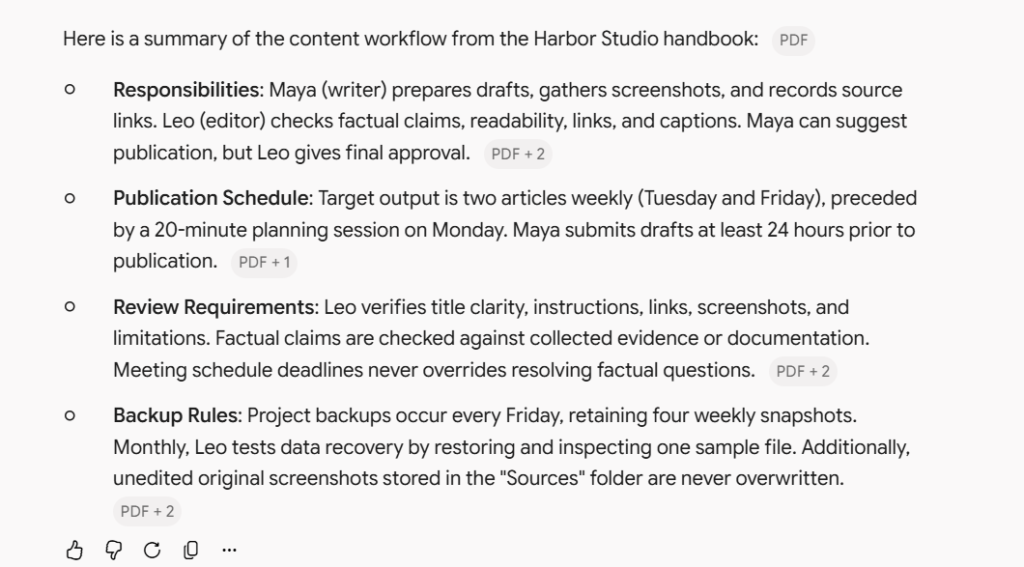
Caption: The summary in Gemini’s notebook chat covered responsibilities, publication timing, review requirements and backup rules from the uploaded handbook.
A reusable request is:
Using only the selected sources, summarize the process under four headings: responsibilities, schedule, review requirements and exceptions. Include source references. Say when a requested detail is not stated.
This gives you a structure to inspect. It does not guarantee that every detail will be correct.
Ask for Evidence Behind a Specific Answer
Next, I asked who could approve publication and whether a deadline took priority over unresolved factual questions.
The response identified Leo and preserved the accuracy-before-schedule rule. It also reproduced supporting passages with PDF reference labels. I compared the answer with the original handbook, which supported both points.
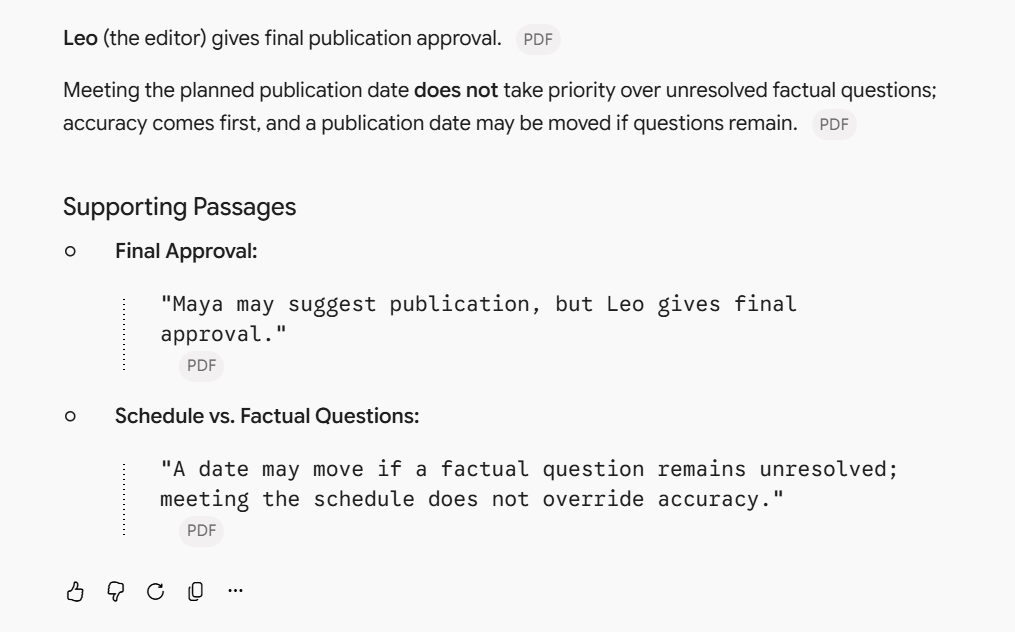
Caption: The answer identified Leo as the final approver and quoted the handbook’s rule that unresolved factual questions take priority over the publication schedule.
Google’s dedicated notebook chat documentation describes citations that can take you to the relevant passage. In this exercise, I checked the displayed answer and supporting wording against the original PDF.
The important question is whether a passage supports the claim, including its conditions and exceptions. For example, evidence that someone may propose publication does not establish that they can approve it.
A citation is a useful starting point for that check. Its presence alone is not enough to settle whether an answer is accurate.
Compare Documents Without Losing Their Dates
After adding the second source, I asked about the difference between the normal and pilot schedules.
The answer kept Tuesday and Friday as the baseline, described Wednesday and Friday as a temporary change, and said the original schedule resumed after the pilot. It also identified Leo’s approval of the exception.
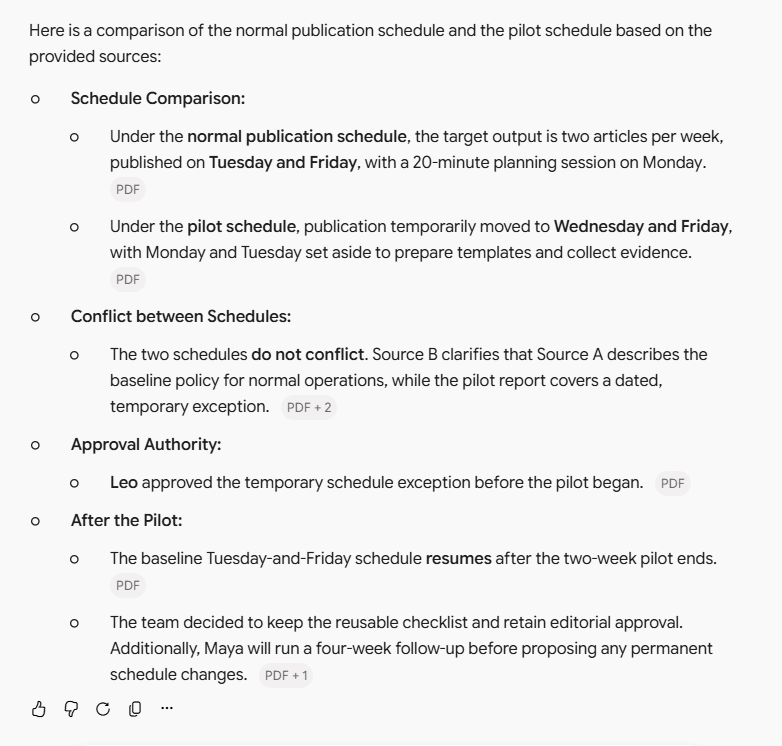
Caption: The comparison distinguished the normal Tuesday-and-Friday schedule from the temporary Wednesday-and-Friday pilot schedule.
This is a useful pattern for reading an original policy alongside an update. Ask about the effective period, the person who approved a change and what happens afterward. Simply asking “Which document is right?” can hide the possibility that both apply under different conditions.
You could try:
Compare the normal rules with the temporary changes. For each difference, state when it applies, who approved it, and whether the original rule resumes afterward. Use only the selected sources and identify missing information.
For a reader working with project notes or internal instructions, this kind of comparison could help separate an ongoing rule from a one-time exception.
Check Both the Numbers and the Conclusion
The fictional pilot report gave an earlier average of 100 active minutes per article and a pilot average of 75 minutes.
The response reported a 25-minute reduction, equal to 25% of the earlier average. Across four articles, it reported 100 fewer active minutes. These values matched the source and the arithmetic.
More importantly, the answer did not treat that difference as proof that AI caused it. It noted that a checklist and AI-assisted outlining had been introduced together, that the sample was small, and that article difficulty was not controlled.
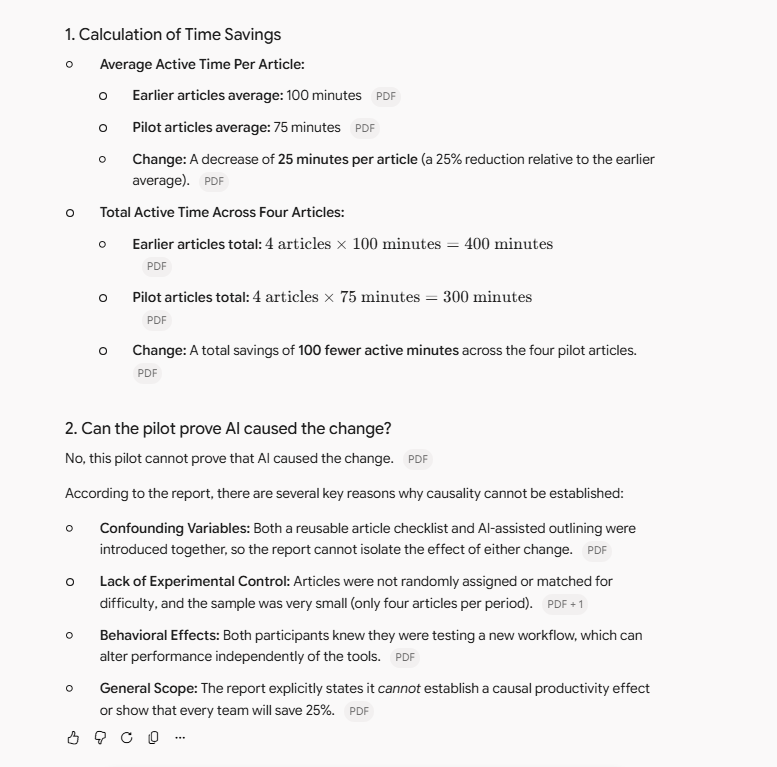
Caption: The answer calculated the reduction from 100 to 75 minutes and explained why the fictional pilot could not prove that AI caused the change.
The report already stated the reduction and its limitations. This exercise therefore shows that the response retained those points; it does not demonstrate independent statistical reasoning or a real-world time saving.
When reading a report, ask two separate questions: “What changed?” and “What can this comparison establish?” A correct calculation can still accompany an overstated conclusion.
Try a Question the Sources Cannot Answer
I also asked about increased revenue and a paid AI subscription. Neither was reported in the PDFs.
The response said that the sources did not report a revenue increase or specify a subscription purchase. That was the appropriate boundary for these documents.
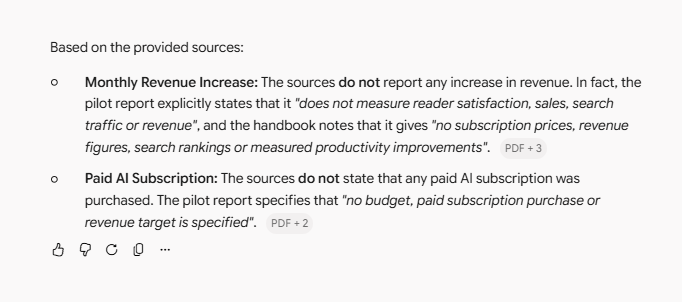
Caption: The response stated that the sources did not report a revenue increase or specify a paid AI subscription purchase.
There is a distinction between “not reported” and “did not happen.” The files could support the former, but they could not prove the latter.
Because the test documents explicitly said these details were missing, this was a relatively easy missing-information check. It is encouraging for this example, but it does not establish that the system will always avoid unsupported answers.
What I Noticed in the English Audio Overview
An Audio Overview turns source topics into an AI-generated spoken explanation. Google’s Audio Overview guide describes formats including a discussion between two hosts and a short single-speaker briefing.
The Studio panel provides an Audio Overview option alongside other ways to work with the source material.
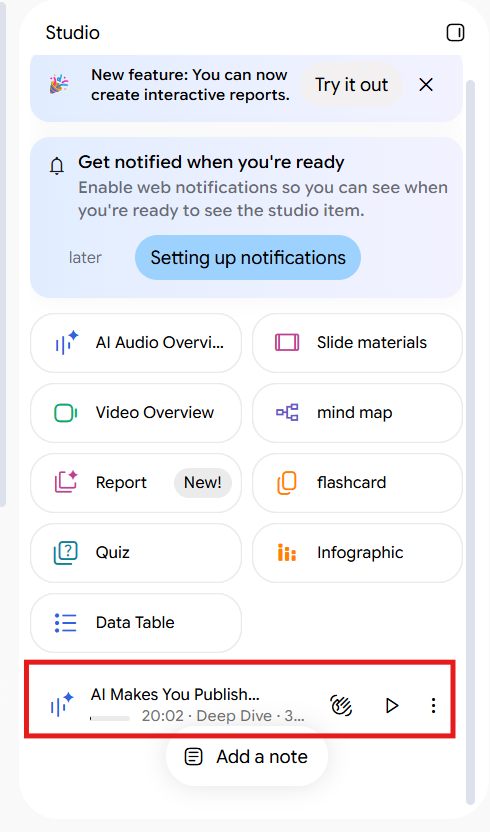
Caption: I generated an English Audio Overview from the test sources and reviewed its main claims against the original PDFs.
I generated and listened to an English Audio Overview using the same PDFs. It turned the documents into a discussion that was easy to follow and preserved many of their main details.
The audio described the five stages of Plan, Collect, Draft, Review and Publish. It also covered the normal publication schedule and distinguished the 120-minute planning allowance from the fictional averages of 100 and 75 minutes.
It explained an important limitation of the pilot: the checklist and AI-assisted outlining were introduced together, so the report could not separate their effects.
However, the discussion also included interpretations that were not stated in the PDFs.
For example, it attributed Maya’s incorrect image caption to rushing. The report mentioned the error and its correction, but did not identify rushing as the cause. The audio also suggested that the temporary schedule helped protect the baseline data, although the sources did not give that explanation.
A broader claim about measuring AI’s true impact went further than the report supported. The original document explicitly said the pilot could not establish a causal productivity effect.
My impression was that the audio captured many key facts while adding its own explanations around them. It was useful for getting the overall picture, but I would check the original documents before repeating a specific cause or conclusion.
For me, the useful question was: “Was that explanation in the PDF, or did the audio add it?”
Other Useful Features to Explore
These features are described in Google’s documentation; they were not evaluated in this exercise.
| Feature | A practical use |
|---|---|
| Mind Maps | Survey the main topics and then explore a branch that needs more attention |
| Flashcards | Practice recalling terms or short facts from the readings |
| Quizzes | Check your understanding after reading rather than only rereading a summary |
Google’s Mind Maps guide describes expandable branches and questions opened from individual nodes. Its flashcard and quiz guide explains difficulty settings and answer explanations.
Choose the output according to the task. If you need an exact deadline, a focused question with a source check is more direct than generating a study aid. If you need to review a topic repeatedly, flashcards or a quiz may suit the job.
You do not need to generate every available format to get something useful from a notebook. Start with the result that would help you complete your current task.
Can You Start for Free?
Google lists a free Standard option. At the time of checking, its plan page listed 100 notebooks per user and 50 sources per notebook, with higher limits available on other plans.
Those figures are published allowances, not limits I tested. They also do not mean unlimited chat or media generation. Check the current limits and the plan shown in your account before deciding to pay.
This small exercise cannot tell me whether a paid plan would be worthwhile for a larger workload. I would first identify a specific limit that gets in the way of work I actually do.
What I Would Use This Workflow For
The strongest part of this exercise was asking increasingly specific questions about the same material. The summary established the basics; follow-up questions exposed the temporary rule, the limits of the numbers and the information the documents did not contain.
The English Audio Overview offered a different way to approach those documents. It was engaging to listen to, but its added interpretations gave me a reason to return to the written sources.
A blogger could apply this workflow to product documentation and release notes before writing a guide. A student could separate definitions from exceptions in course readings. A small team could compare a handbook with a dated update before preparing an internal explanation.
My test was deliberately small: two short, clearly structured, fictional PDFs. It did not cover long scanned files, difficult layouts or a large source collection. The saved chat observations also come from Gemini’s notebook interface, so I would not present them as a benchmark of every NotebookLM experience.
To try the approach yourself, start with one familiar document, ask a question whose answer you can check, and then add a related source. Use summaries and audio to become familiar with the material, and use the original passages to decide what you can confidently say about it.