Automation sounds useful until you have to decide whether it is useful enough to pay for.
Before upgrading, I wanted to answer a practical question: can Zapier’s Free plan complete a useful task from start to finish?
To find out, I built a simple automation connecting Google Sheets and Trello. When I added a new spreadsheet row, Zapier would create a Trello card using the same title and notes.
I tested the connection, published the workflow, added a separate new row, and checked both the resulting card and my task usage.
It worked. My Free account went from 0/100 to 1/100 tasks used after the successful live action.
That gives a concrete example of what the Free plan can do. It also helps explain where its limits start to matter.
What Does Zapier’s Free Plan Include?
At the time of my test, Zapier’s Free plan displayed the following:
| Feature | Free plan |
|---|---|
| Price | $0 per month |
| Task allowance | 100 tasks per month |
| Number of Zaps | Unlimited |
| Workflow structure | Two-step Zaps: one trigger and one action |
A Zap is an automated workflow. The trigger starts it, and the action performs the task that follows.
For my test, a new spreadsheet row was the trigger. Creating a Trello card was the action.
Unlimited Zaps does not mean unlimited usage. The workflows share the account’s task allowance; creating another Zap does not provide another 100 tasks.
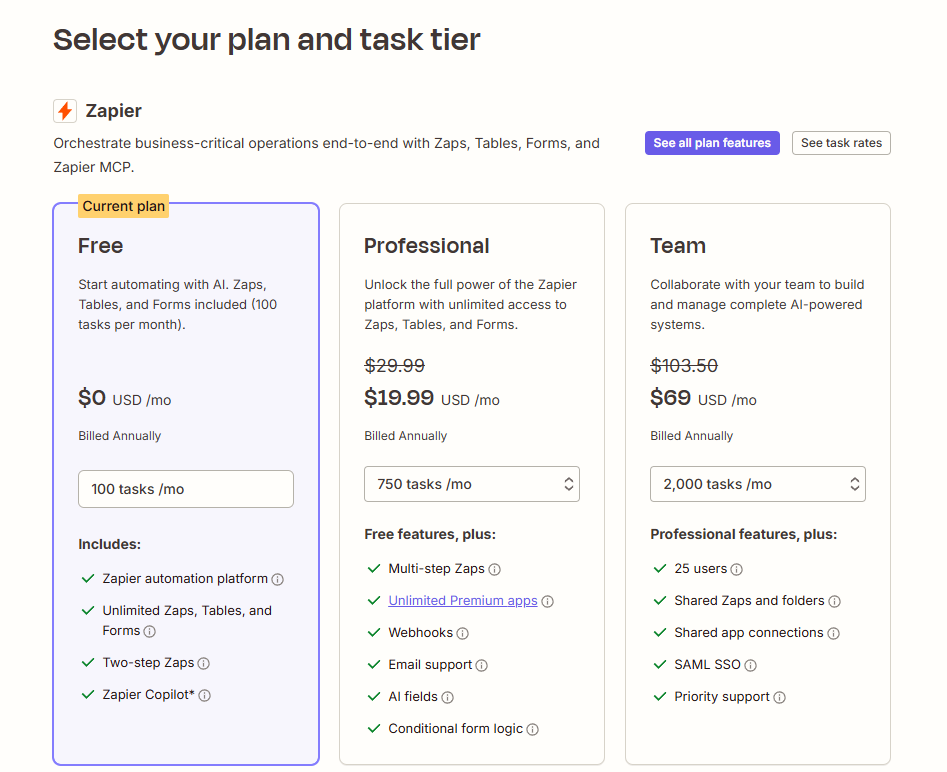
Caption: Zapier’s Free plan showed 100 monthly tasks and two-step Zaps, while multi-step workflows were listed under Professional.
You can check the current conditions on Zapier’s pricing page.
My Starting Point: 0 of 100 Tasks Used
Before running the live automation, I checked my account’s plan and usage.
It showed the Free plan with 0/100 tasks used.
This gave me a starting point for checking whether a successful live action would affect the counter.
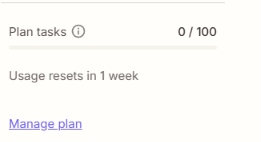
Caption: Before the live automation ran, my Free account showed 0 of 100 monthly tasks used.
This account check matters because a free trial and the ongoing Free plan are different.
Zapier’s initial new-account trial provides temporary access to paid features. A workflow working during that trial does not prove it will continue working on the Free plan afterward.
For this test, I checked that the account displayed Free, rather than relying only on the fact that I had not paid.
The Workflow: Google Sheets to Trello
I prepared a Google Sheet with two columns:
| Title | Notes |
|---|---|
| TEST 01 | Zapier test |
| TEST 02 | Second Zapier test |
The intended result was straightforward: the spreadsheet’s Title would become the Trello card name, and Notes would become the card description.
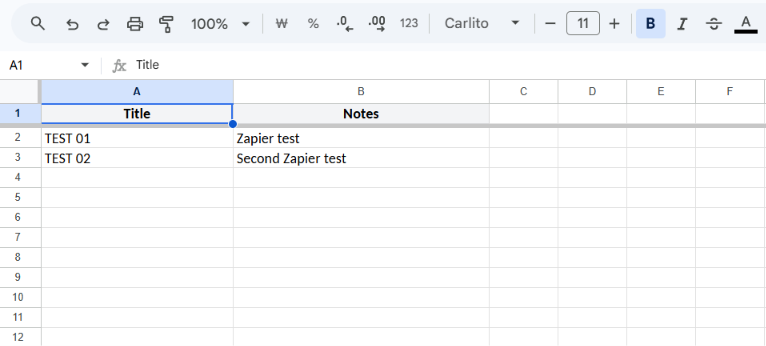
Caption: I prepared a Google Sheet with Title and Notes columns for the automation test.
This is a useful example when you already collect information in a spreadsheet and organize work in Trello.
If you only use Trello, entering the idea there directly may be simpler. The value comes from removing a transfer you already repeat.
The workflow also does not need an AI writing step. It moves existing information into the appropriate fields.
Could Zapier Read the Right Information?
I first tested the Google Sheets trigger.
Zapier retrieved the spreadsheet records, and I selected TEST 01. The returned data included the expected title and the note Zapier test.
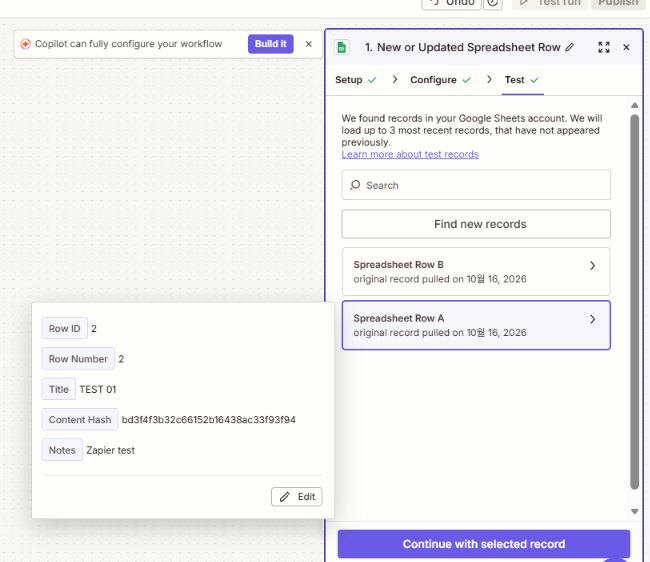
Caption: The trigger test retrieved the expected Title and Notes values from Google Sheets.
This confirmed that the connection could retrieve the information I wanted to use.
Next, I configured the Trello action and mapped the fields. Field mapping tells Zapier where each piece of spreadsheet data should go.
After running the action test, I opened Trello and checked the actual card. Its name was TEST 01, and its description was Zapier test.
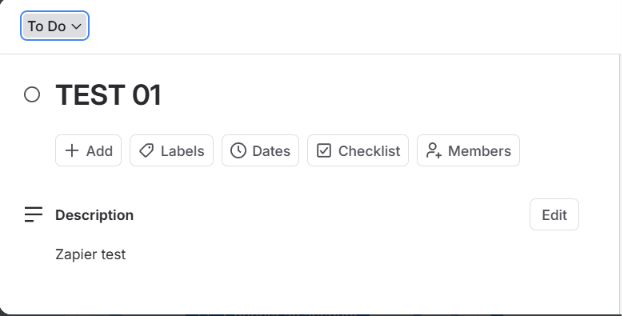
Caption: The action test created a Trello card with the spreadsheet title and notes in the intended fields.
Checking the destination app was important. A success message alone would not tell me whether I had placed the information in the correct fields.
Would It Work After Publishing?
The editor test showed that the configured action could work with sample data. I still needed to check the published workflow.
After publishing the Zap, I added a separate row:
TEST 03 | Live Zap test
I did not manually create the corresponding Trello card.
The published automation processed the new row, and Trello received a card named TEST 03 with Live Zap test as its description.
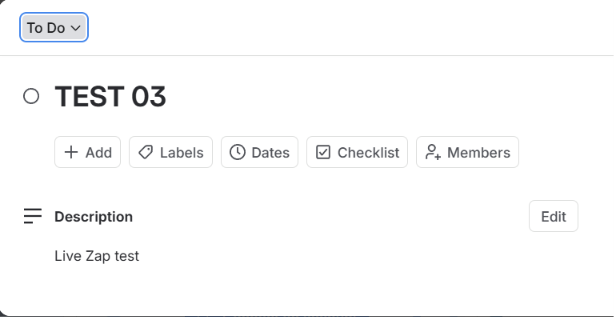
Caption: After the Zap was published, a new spreadsheet row produced a matching Trello card with the expected title and description.
This was the clearest result of the test. The workflow responded to new information after it was turned on and completed the transfer between the two apps.
How Many Tasks Did the Live Run Use?
After the successful live action, my usage counter updated from 0/100 to 1/100.
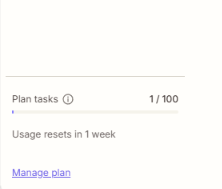
Caption: Following the successful live run, the account’s task counter increased from 0/100 to 1/100.
That matched the behavior described in Zapier’s task usage documentation: trigger checks do not consume tasks, while a standard successful action generally does.
In this workflow, one new row led to one successful card-creation action, and the counter increased by one.
For planning purposes, assuming the same one-task action and no other account usage:
| Successful card creations per month | Estimated tasks |
|---|---|
| 20 | 20 |
| 90 | 90 |
| 150 | 150 |
These are calculations, not additional test results.
The example makes one point clear: a simple workflow can still exceed the Free plan if it runs frequently. Other workflows using the same allowance also need to be included in your estimate.
Does the Free Plan Always Take 15 Minutes?
Zapier lists a 15-minute interval for polling triggers on the Free plan. Polling means checking the connected app periodically for new information.
However, some app events support instant triggers, which receive information when the app sends it. The available trigger type depends on the selected app and event.
That means “every free automation takes 15 minutes” is not an accurate description. A polling interval is also not a guaranteed completion time.
My test confirmed that the card arrived, but I did not measure the delay precisely. For a blog-idea workflow, timing is less important to me than having the correct information arrive. For an urgent notification, I would examine the trigger’s timing more carefully.
What Can Make You Need a Paid Plan?
The first limit you reach may be workflow complexity rather than task volume.
My workflow had one trigger and one action. Creating a card, sending a separate notification, and updating another database would require additional actions.
Zapier lists multi-step Zaps as a paid feature.
App access is another limit. Apps marked Premium require a paid Zapier plan or an eligible trial. The connected service may also have its own subscription requirements for integration access.
Before building a workflow you want to keep free, check three things: whether the apps are available on the Free plan, whether one action is enough, and whether the expected usage fits your allowance.
If the task limit is reached, runs can be held until capacity becomes available. Review the account’s usage and Zap History instead of assuming processing will continue indefinitely.
Was It Easy Enough for a Beginner?
The idea was easy to understand. The setup took more attention.
I had to choose the correct Google account, spreadsheet, worksheet, Trello board, and list. I also needed to understand how the spreadsheet fields connected to the card fields.
Terms such as trigger, action, and mapping became clearer once I saw the first card appear with the correct information.
For a first attempt, I would use distinctive test titles and check both the editor test and a separate live run. That makes it easier to distinguish a working configuration from an automation that is responding to new data.
Is Zapier’s Free Plan Worth Using?
Based on this test, I would consider the Free plan for a small, recurring transfer between apps I already use.
It let me build, publish, and run the Google Sheets-to-Trello workflow. The live result and task counter gave me a concrete way to understand what that automation used.
Whether it is worth keeping depends on the routine. For something I do once a month, manual entry may be easier. For a repeated task, I would estimate monthly usage and decide whether the removed work justifies maintaining the connection.
Start with one clearly defined job. Check the result, the usage, and the limitations before making the workflow more complicated.